
|
Release notification |
|
|
New version available
Accessibility scan, monitor, fix hub, dashboard and more!
|
|
Extension key
ns_t3aa
|
|
You are on
{{CURRENT_VERSION}}
|
|
New version
14.4.0
|
|
Released
16 Sep 2026
|
|
|
Hello {{FIRST_NAME}},
Version 14.4.0 of AI Accessibility (T3AA) brings a redesigned backend module so you can see where the site stands, scan pages against WCAG and Lighthouse, track issues in Fix Hub, and review AI alt text drafts — without leaving TYPO3.
|
|
How to update
Around 10 minutes. Pick the method that matches your installation.
|
Composer update
Update from your project root. Your licensed Composer repository must already be configured.
composer update nitsan/ns-t3aa
vendor/bin/typo3 cache:flush |
|
|
Without Composer
Everything happens in the TYPO3 backend, no terminal needed.
| 1 | Open Admin Tools › License Manager. | | 2 | Click Check for Updates. | | 3 | Click Update to 14.4.0 next to AI Accessibility. | | 4 | Flush caches under Admin Tools › Maintenance. |
|
|
|
Dependencies
| Package |
Version |
TYPO3 CMS Core
typo3/cms-core | 12.4.0 – 14.4.99 |
| PHP | 8.2.0 – 8.4.99 |
AI Foundation (T3AF)
nitsan/ns-t3af | 1.2.0 – 1.99.99 |
License Manager
nitsan/ns-license | 14.5.0 – 14.9.99 |
Running TYPO3 11 or older? This release needs TYPO3 12.4 or newer, and older TYPO3 versions no longer receive security updates. Talk to us about the upgrade before you update the extension.
|
|
Release highlights
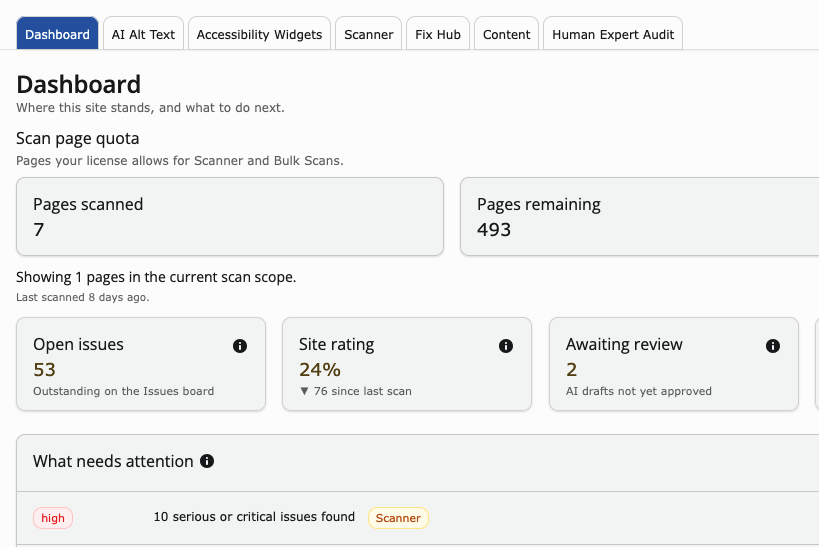 | One overview of your site’s accessibility status Open the Dashboard to see how many pages you can still scan, how many issues are open, your site rating, and AI alt text drafts waiting for review — then jump straight to the work that needs attention. |
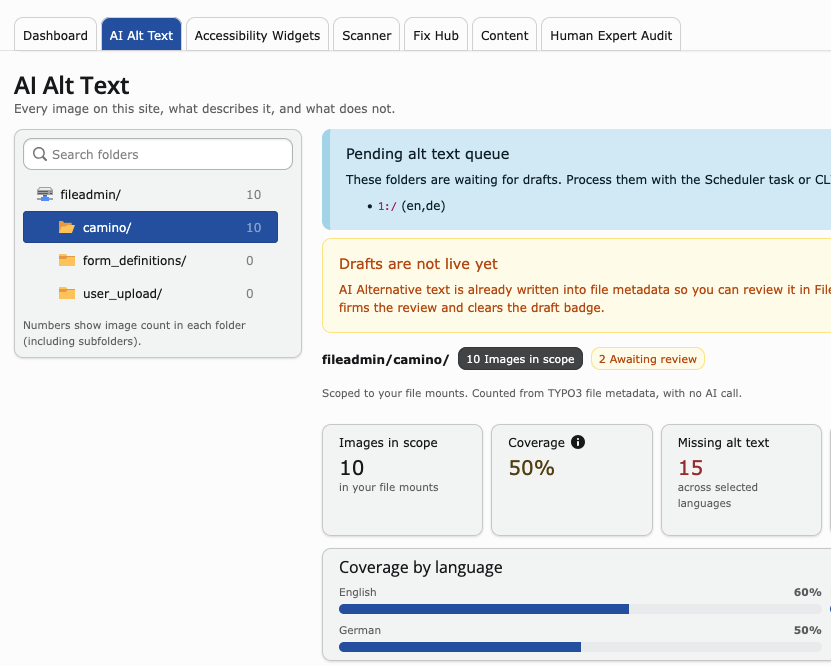 | AI Alt Text: generate, review, then confirm Open a folder in AI Alt Text to see how many images still miss alternative text in each language. Generate drafts with AI, review them in the backend, and confirm only when you are ready — drafts stay in file metadata and do not go live on their own. |
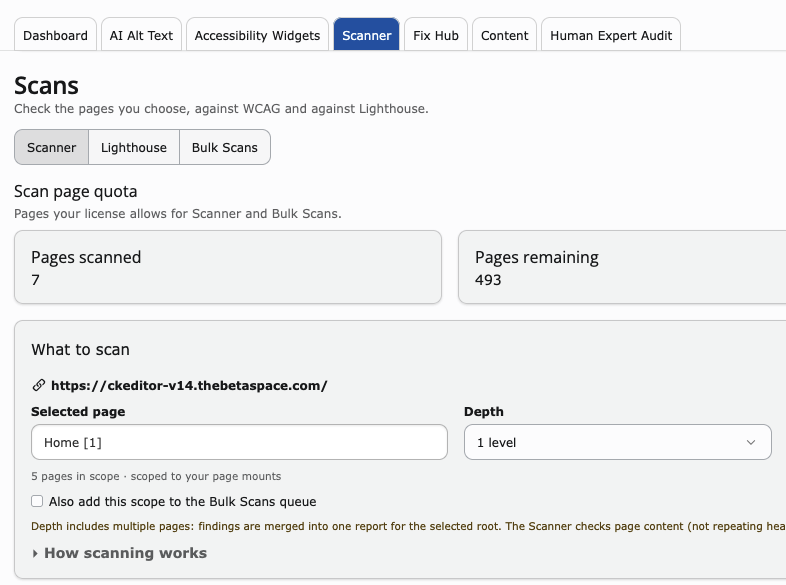 | Bulk Scans and ongoing page monitoring Select pages in your site tree, run a scan immediately or queue them for Bulk Scans, and enable monitoring so new findings are collected over time — results stay within your page mounts, and scan-page quota is shown before you start. |
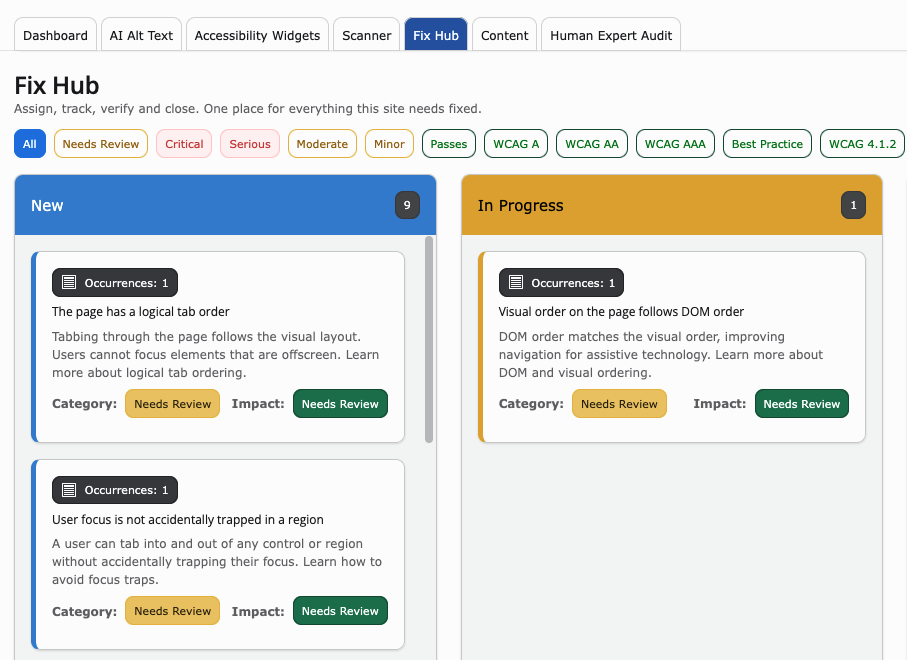 | Fix Hub: track and close accessibility findings After a scan, open Fix Hub to filter findings by severity and WCAG level, review each issue with its occurrences, and move work from New to In Progress until it is verified and closed — all in one board. |
|
|
Everything else in 14.4.0
New | • | Added a setup checklist on the Dashboard so editors can see which AI Accessibility steps are still missing before they start scanning or generating alt text. | | • | Expanded the Accessibility Widgets tab with clearer configuration options and product labels, so editors can set up the frontend widget from the same module. | | • | Introduced Fix Hub with filters by severity and WCAG level, plus pagination and Load more for occurrences, so large scan reports stay workable from New through In Progress to closed. | | • | Added Filemeta and Filemeta Bulk on the Content tab so editors can generate title, description, and related file metadata with AI without leaving the dashboard. |
Improved | • | Tightened licence checks so the frontend accessibility widget and expert audit features only run when your AI Accessibility licence is valid. | | • | Improved module navigation and layout consistency across TYPO3 12, 13, and 14. |
|
|
Ready when you are
Your licence runs to {{LICENCE_END_DATE}}, so {{VERSION}} is included.
|
|
|
|
|
|
|
You receive this because you hold a licence or trial for AI Accessibility & Widget (T3AA).
Unsubscribe from AI Accessibility & Widget (T3AA) release update emails
|